


_______________________________________________________________ NeoBux Banner
Showing posts with label PayPal. Show all posts

December 3, 2008

List of Methods of How to Withdraw Paypal Funds in the Philippines

Based on personal experiences posted by dozens of PayPal Philippines users, this post summarizes the different ways of withdrawing Paypal in the Philippines.

Possible Methods of Withdrawing PayPal in the Philippines
Each method is explained in detail below.


UnionBank EON or eWallet Debit card – POSSIBLE
This is confirmed by various people, including several PinoyMoneyTalk Forum members.

Citibank Visa Credit Card – POSSIBLE
According to snow.gameshogun.ws, payments are considered “Cash Advance” which incurs additional fees and monthly interest charges. Alternatively, an “Over-payment Cheque,” which has no fees and interest charges, can be requested from any Citibank branch.

Citibank Mastercard Credit Card – POSSIBLE
This is confirmed by Jeffrey.

HSBC Visa Credit Card – POSSIBLE
noelb explained that funds are treated as payment to the credit card balance. If there is no card balance, it will be treated as an overpayment. Money can be withdrawn by applying for a Cash Advance.
Jericho shared that his first PayPal-to-HSBC Visa Card transaction took 2 days to complete, but his second transfer was processed after only 1 day.


Standard Chartered Visa Credit Card – POSSIBLE
This is confirmed by nailbiter.

Metrobank Visa Credit Card – POSSIBLE
According to snow.gameshogun.ws funds appear as a Cash Advance or Payment to a credit card balance.

Equitable PCI (EPCI) Bank Visa Electron Debit Card – POSSIBLE
This is confirmed in a post on the eBay.ph Forum, although nodules reported that her EPCI card does not have a CVV Number. Biske suggested that the CVV be requested directly from EPCI.

Xoom.com – POSSIBLE
2slick shared that he was able to send money to himself via Xoom and the funds were credited to his UnionBank account a day later. He stressed, though, that his PayPal account is a Verified Premier Account.
Be warned that PayPal sometimes put a limit on accounts that use the Xoom withdrawal method.
Latest Update: according to Jericho, Xoom has now prohibited intra-Philippines transfers “until further notice.” The buzz is that PayPal does not want a non-affiliated middle-man such as Xoom to be part of the withdrawal process.


Chikka.com – POSSIBLE
According to writeservices: “Sa chikka, within minutes andyan na pera mo. Mahal nga lang in the long run kasi $7 per Php 5,000 ang kaltas (Using Chikka, your money is available in just a few minutes. However, it gets expensive in the long run because the fee is $7 for every P5,000).”

Scriptlance.com – POSSIBLE
The process may seem complicated at first glance because PayPal is initially withdrawn as e-gold then converted into cash.
2slick explains how the process goes: a deposit must first be made to a Scriptlance account and the balance is withdrawn as e-gold. Received e-gold funds are then converted to cash through e-currency exchangers such as PinoyGoldeXchange.net. Expected total lead time for this process is 4 days.
Biske added that a Scriptlance Payment Verification document needs to be sent for the first deposit over $50. She warns that Scriptlance might find it suspicious if a member frequently deposits PayPal then withdraw it using e-gold or Moneybookers.


Bank ATMs and Debit cards without a Visa or Mastercard logo (e.g., BPI ExpressCash, BDO CashCard, Citibank CitiCard) – Almost Always NOT POSSIBLE
If your card does not have a Visa or Mastercard logo, it probably does not support PayPal withdrawals. To confirm, try it in PayPal. Let us know if it works.

BDO Debit card with Mastercard Electron logo – NOT POSSIBLE
This is confirmed by baka.

BDO Mastercard Credit Card – NOT POSSIBLE
This is confirmed by jtag.

ChinaTrust Visa Credit Card – NOT POSSIBLE
This is confirmed by jtag.

Globe G-Cash – NOT POSSIBLE
G-Cash cannot be used in PayPal because it is neither linked to any bank account nor affiliated with Visa or Mastercard. The absence of a physical card also makes it impossible to get a Card Number and CVV Number, things necessary to successfully attach a card in PayPal.

Source: PinoyMoneyTalk.com


RELATED ARTICLES:

November 15, 2008

How to Transfer Funds from Paypal to Your Local Savings Account?

Disclaimer: As of writing, I have made this tutorial for illustration purposes only. The images below may not be the same with PayPal’s actual site. PayPal reserves the right to amend, update or change the site’s layout at any time.


1.Log into your PayPal account.


2. On your Account Overview, click WITHDRAW.


3. On your Withdraw Funds interface, under Options, click WITHDRAW FUNDS TO YOUR BANK ACCOUNT.


4. On the space provided for AMOUNT, write the amount you wish to withdraw, and then click CONTINUE.


5. Review your transaction. Make sure all the information you entered are correct and valid and then confirm.

6. Wait for your money in your savings account.


RELATED ARTICLES:

November 1, 2008

How to Add Your Local Savings Account to Your PayPal Account?

Disclaimer: As of writing, I have made this tutorial for illustration purposes only. The images below may not be the same with PayPal’s actual site. PayPal reserves the right to amend, update or change the site’s layout at any time.


1.Log into your PayPal account.


2. On your Account Overview, click PROFILE


3. On your Profile Summary, under Financial Information, click BANK ACCOUNTS.


4. On the spaces provided, add your Bank Name, Bank Code and Account Number.


For Philippine Residents: You may add your Bank Name such as Bank of the Philippine Islands or Banco De Oro. Please click here for the list of Bank Codes.

5. Click CONTINUE.

6. Review your bank account information. Make sure all the information you entered are correct and valid, otherwise, transfers to and from your PayPal account will be returned. A return fee will apply, and your bank may charge additional fees.


7. Click ADD BANK ACCOUNT.

8. You have successfully added your local savings account to your PayPal account. You can now transfer funds to and from your PayPal account to your local bank account.


RELATED ARTICLES:

October 8, 2008

List of Philippine Bank Swift Codes

8-Digit Bank Swift Codes

Allied Banking Corporation - ABCMPHMM
American Express Bank Philippines - AMEXPHMM
Banco de Oro Universal Bank - BNORPHMM
Bank of China Manila Branch - BKCHPHMM
Bank of Commerce - PABIPHMM
Bank of the Philippine Islands - BOPIPHMM
China Banking Corporation - CHBKPHMM
Development Bank of the Phil. - DBPHPHMM
East West Banking Corporation - EWBCPHMM
Equitable PCI Bank - PCIBPHMM
Hong Kong and Shanghai Bank - HSBCPHMM
International Commercial Bank of China - ICBCPHMM
International Exchange Bank - INXBPHMM
Land Bank of the Philippines - TLBPPHMM
Maybank Philippines Incorporated - MBBEPHMM
Metropolitan Bank & Trust Co. - MBTCPHMM
Philippine Bank of Communications - CPHIPHMM
Philippine National Bank - PNBMPHMM
Philippine Veterans Bank - PHVBPHMM
Philtrust Bank - PHTBPHMM
Prudential Bank - PILBPHMM
Rizal Commercial Banking Corp. - RCBCPHMM
Security Bank and Trust Corp. - SETCPHMM
Standard Chartered Bank - SCBLPHMM
Union Bank of the Philippines - UBPHPHMM
United Coconut Planters Bank - UCPBPHMM
United Overseas Bank Philippines - UOVBPHMM


RELATED ARTICLES:

List of Philippine Bank Codes

9-Digit Bank Codes

Allied Banking Corporation - 010320013
Australia New Zealand - 010700015
Asia United Bank - 011020011
Bangko Sentral ng Pilipinas - 010030015
Bangkok Bank - 010670019
Bank of America - 010120019
Bank of China - 011140014
Bank of Tokyo - 010460012
Banco De Oro (& Epcib) - 010530667
Bank of Commerce - 010440016
Bank of the Philippine Islands - 010040018
China Banking Corporation - 010100013
China Trust Commercial Bank - 010690015
Citibank N.A. - 010070017
Development Bank of the Phil. - 010590018
Deutsche Bank - 010650013
East West Banking Corporation - 010620014
Export and Industry Bank - 010860010
Fuji Bank - 010640010
Hong Kong and Shanghai Bank - 010060014
International Commercial Bank of China - 010560019
International Exchange Bank - 010680012
JP Morgan Chase Bank - 010720011
Korea Exchange Bank - 010710018
International Nederland Bank - 010660016
Land Bank of the Philippines - 010350025
Maybank Philippines Incorporated - 010220016
Metropolitan Bank & Trust Co. - 010269996
Philippine Bank of Communications - 010110016
Philippine National Bank - 010080010
Philippine Trust Company - 010090039
Philippine Veterans Bank - 010330016
Prudential Bank - 010150018
Rizal Commercial Banking Corp. - 010280014
Security Bank & Trust Co. - 010140015
Standard Chartered Bank - 010050011
United Coconut Planters Bank - 010299995
Union Bank of the Philippines - 010419995
United Overseas Bank - 010270189


RELATED ARTICLES:

September 18, 2008

How to Withdraw Funds from AlertPay?

I have searched and read other ways to withdraw funds from AlertPay, but I will concentrate on the 2 tested ways on how to get your money:


MAILED CHECKS

As of writing, I’m not really sure how they mail the checks, whether by international couriers or just the ordinary mail. We all know how the mailing system in our country works (with all the anomalies done by some employees, especially if they knew the mail was sent from a foreign country and probably have a check enclosed). So it is really up to you if you want to choose this option.


1. Login to your AlertPay account.

2. Request for a withdrawal via mailed check.

3. Checks are sent to you via regular mail and are issued in US Dollars. They send out the checks within 1-2 business days after your request. Outside of Canada/US, it can take up to 3-4 weeks for you to receive your checks in the mail.

4. Encash checks on money changers accepting international checks in Dollars or deposit your check at your own bank account.

5. Wait for the processing time of your check, approximately 3-4 weeks.


ALERTPAY TO PAYPAL

AlertPay and Paypal are two competing companies, therefore, there is NO way to transfer one’s fund to another. However, there is a way to convert your AlertPay fund into PayPal fund.

1. Cashout your earnings at your PTC programs via AlertPay.


Note: Images are clickable.


2. Invest your AlertPay funds to your most trusted PTC sites that has an option to withdraw earnings via PayPal. Investing means making purchases of referrals or upgrading to premium memberships. Such PTC sites are: EARNMYBUX, MAKEMYBUX, CASHMYBUX, CLICKMYBUX, ISABELMARCO,NEOBUX, FINANCIALFREEDOMADS and THINKBUX

3. Withdraw your PTC earnings via Paypal.


4. Transfer your Paypal funds via UnionBank’s EON CyberAccount. Withdraw your cash on ATM machines with VISA, PLUS and MEGALINK logos.


AlertPay is the easiest way to receive money online.
You don’t have an account yet? Click here to sign up.


RELATED ARTICLES:

September 15, 2008

How to Transfer Payment from PayPal Balance to Your UnionBank’s EON CyberAccount?

1. Once the payment has reflected in your Paypal balance, you can transfer the funds to your UnionBank Debit card by using the withdrawal feature. Please take note, there is a minimum withdrawal limit depending on the currency which you want to withdraw. For US Dollars it is $10.00.

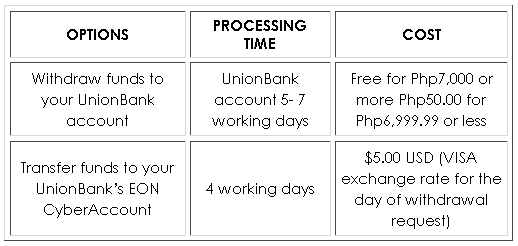
2. You will be given 2 options in withdrawing your funds. Please choose the "transfer funds to your card" option. Paypal charges $5.00 USD for this facility. Then confirm the transfer.

3. The transfer to your UnionBank Debit card will be completed within 4 working days from the date of your withdrawal request. A status report of your withdrawal request is reflected in your Account Overview screen.

4. Your funds will be converted to the peso equivalent using the VISA Exchange rate for the day of the withdrawal request.


How to Withdraw Payment from PayPal Balance to Your UnionBank Account?

1. Log into your PayPal account. Click "My account" tab and then "Withdraw" sub tab

2. Select the "Withdraw funds to your bank account option" (See fees below)

3. Select the bank account and amount to withdraw

4. Confirm the transfer


  • Please note the terms and conditions of Paypal concerning the frequency of payment acceptance. Personal Accounts can only accept payments monthly and up to 5 credit or debit card payments annually with your Personal account. Premier Accounts allow you to accept credit or debit card payments for only 3.4% plus $0.30 USD per transaction.
  • FULL USE: Limits shall be based on the available balance for debit cards and the available credit limits for credit cards or other limits imposed by PayPal or the bank.
  • For regular enrollment, you have a limit of $100.00 for every transaction. With the expanded use number, you will have a $500.00 limit for every transaction with UnionBank's VISA Cards!


How Much is the Cost for PayPal Balance Transfer?


RELATED ARTICLES:

September 14, 2008

How to Earn from PayPal’s Referral Program?

Disclaimer: As of writing, I have made this tutorial for illustration purposes only. The images below may not be the same with PayPal’s actual site. PayPal reserves the right to amend, update or change the site’s layout at any time.


Here's how to get started:

1. Login to your PayPal account. Look for the Referral Link and click it to view your referral code.


2. Get your personalized referral link and send it thru emails, add as a banner to your website, or incorporate into your e-commerce application.


3. Each time a new merchant signs up for a PayPal Business or Premier account via your link or banner, you'll immediately start receiving 0.5% of their payment volume - up to $1,000.00 USD.


4. In addition, you will receive a residual payout equivalent to 0.5% of the total amount of the merchant's PayPal payments for 12 months after the initial creation of the account.

5. You are eligible to receive bonus payouts for the first 12 months of the Merchant's account ownership. PayPal will send your initial payout within one week of the Merchant reaching the initial US$200.00 while Residual Payouts will be made no sooner than every 30 days after the transaction.


RELATED ARTICLES:

How to Become PayPal Verified via UnionBank’s EON CyberAccount?

Disclaimer: As of writing, I have made this tutorial for illustration purposes only. The images below may not be the same with PayPal’s actual site. PayPal reserves the right to amend, update or change the site’s layout at any time.


1. Log into your PayPal account. Click "Profile" tab and then click "Bank account."


2. Add bank details. The bank code number of UnionBank is 010419995.
(Please take note that your first name and surname on your Paypal account must match the name of your bank account. If it does not, the withdrawal request will be rejected by UnionBank.)


3. Review your bank account information.

4. Confirm your account.


I wish you good luck and great earnings!


RELATED ARTICLES:

September 13, 2008

How to Open a PayPal Account?

Disclaimer: As of writing, I have made this tutorial for illustration purposes only. The images below may not be the same with PayPal’s actual site. PayPal reserves the right to amend, update or change the site’s layout at any time.


1. Be sure to have your own e-mail account that you can use for your PayPal account only. Even if you have an e-mail address that you use to communicate with friends and family, it is better to have a separate one that you can use just for your PayPal account.


2. Sign up here.


3. Start creating your PayPal account by choosing your country and type of PayPal account.

For the purpose of illustration, I will choose a Personal account.


PERSONAL accounts give you access to the core features, but that's all. Customer support is mostly via e-mail. There is a phone number available, but it is not toll-free and it sends users to a low-priority line with long wait times. There are no transaction fees for personal accounts, though there are fees for some other features, such as currency exchange. Personal accounts are also subject to volume limits of $500 per month. If you receive more than that, you will need to upgrade to a Premier or Business account (or deny the transfer that would have put you over the limit).

PREMIER and BUSINESS accounts are almost the same. The main difference is that a Business account must be registered with a business or group name, while a Premier account can be registered with a business, group or individual. Business accounts can also be set up for multiple users.

Business and Premier accounts allow access to all of the core features, plus the ability to accept unlimited credit card payments, payment receiving preferences, subscriptions, ATM/Debit Card and mass payments.

Business and Premier Accounts also get a toll-free customer service number and extended customer service hours. These extra features come at the cost of transaction fees. Sending money is still free, but 2.9 percent is charged for funds received. Extremely high-volume accounts get a break -- after $3,000 has been received in a month, the percentage drops to 2.5 percent. Above $10,000, it goes to 2.2 percent, and money in excess of $100,000 received in a single month is only charged at 1.9 percent. In addition, all transactions in which money is received, regardless of volume, have a $0.30 fee added.


4. From there, you will go to a page that asks for your basic personal information -- your name, address, telephone number and e-mail address. You will also be required to enter security questions in case you lose your password, and you have to enter a randomly generated series of letters and numbers, which help prevent fraud. Once you confirm your account, a sign-up confirmation will be sent to you via e-mail.


5. Open your e-mail and your will see confirmation e-mail from PayPal. Click on the link to confirm your e-mail address.


6. Congratulations! You have confirmed your PayPal account. Click on continue and you will be directed to your PayPal account page.


7. Familiarize yourself with your new PayPal account interface. Then link and confirm your debit or credit account.


8. Adding a valid, current credit card to your account will allow PayPal to confirm your address (if it matches where you receive your credit card statements). Having a confirmed address shows both buyers and sellers that you are less likely to be a scammer. You can also use your credit card for PayPal's Expanded Use service, which allows you to draw money from the credit card, instead of just from a bank account.


You can still go ahead and use all of the features in PayPal while you are undergoing the verification process. However, when various transactions involve substantial amounts, PayPal’s security center may ask members to become verified first before proceeding with their transactions.

For Philippine Users: Click here on how to get verified.

9. You can now use this PayPal account e-mail address when signing up with your online businesses to accept payments. Remember to read the Terms and Conditions or the Help Center if you have any questions.


I wish you good luck and great earnings!


PayPal is the easiest way to receive money online.
You don’t have an account yet? Click here to sign up.


RELATED ARTICLES:

What is PayPal?

PayPal is the safer, easier way to pay and get paid online. The service allows anyone to pay through credit cards, bank accounts, buyer credit or account balances, without sharing financial information. PayPal enables global e-commerce by making payments possible across different locations, currencies, and languages.

According to Wikipedia (http://en.wikipedia.org/wiki/PayPal), PayPal is an e-commerce business allowing payments and money transfers to be made through the Internet. It serves as an electronic alternative to traditional paper methods such as cheques and money orders. PayPal performs payment processing for online vendors, auction sites, and other corporate users, for which it charges a fee. It also charges a transaction fee for receiving money (a percentage of the amount sent plus an additional fixed amount). The fees charged depend on the currency used, the payment option used, the country of the sender, the country of the recipient, the amount sent and the recipient's account type.


Sign up for PayPal and start accepting credit card payments instantly.


Why Open A PayPal Account?


Here are some of the benefits of opening a PayPal account:

  • You must add an online payment processing service such as a PayPal account in order to for you to accept online payments from your online businesses. Most of these sites send you your payments through PayPal.


  • You can send and receive money from friends and family worldwide (as long as they have an e-mail address and a PayPal account too).


  • Do you own a website? People can pay you thru your PayPal account if you have a "donation" link or when you sell your products online.


  • You can also use your PayPal account for online shopping. It is accepted at some of the world’s top online stores and is the preferred payment method on eBay.com. Check out with confidence at millions of merchants without exposing your financial details.


  • You have 100% protection against unauthorized payments sent from your account.


  • Earn Money from PayPal’s Affiliate Program by simply referring people to open their own PayPal merchant account. Click here to know more about PayPal’s earning potential!


  • PayPal is the easiest way to receive money online.
    You don’t have an account yet? Click here to sign up.


    RELATED ARTICLES:


    SUBSCRIBE TO MY FEED

    Subscribe in a reader

    Enter your email address:

    Delivered by FeedBurner